
Webflow vs Umbraco

Webflow and Umbraco can both support serious marketing websites, but they come from opposite ends of the CMS market. Webflow is a managed visual platform where the website, CMS, hosting, and publishing workflow live together. Umbraco is an open-source .NET CMS that developers can host, extend, and integrate around the organization. The choice is largely about control: Webflow removes infrastructure and gives marketers more ownership, while Umbraco gives technical teams more architectural freedom and responsibility.
Umbraco CMS back-office interface showing the Checkout section under Swift Shop with various checkout settings including Order Line Property Aliases, Checkout Back Page set to Cart, Terms and Conditions Page, Privacy Policy Page, Hide from Navigation toggle off, Require Login toggle on, and Login Page.
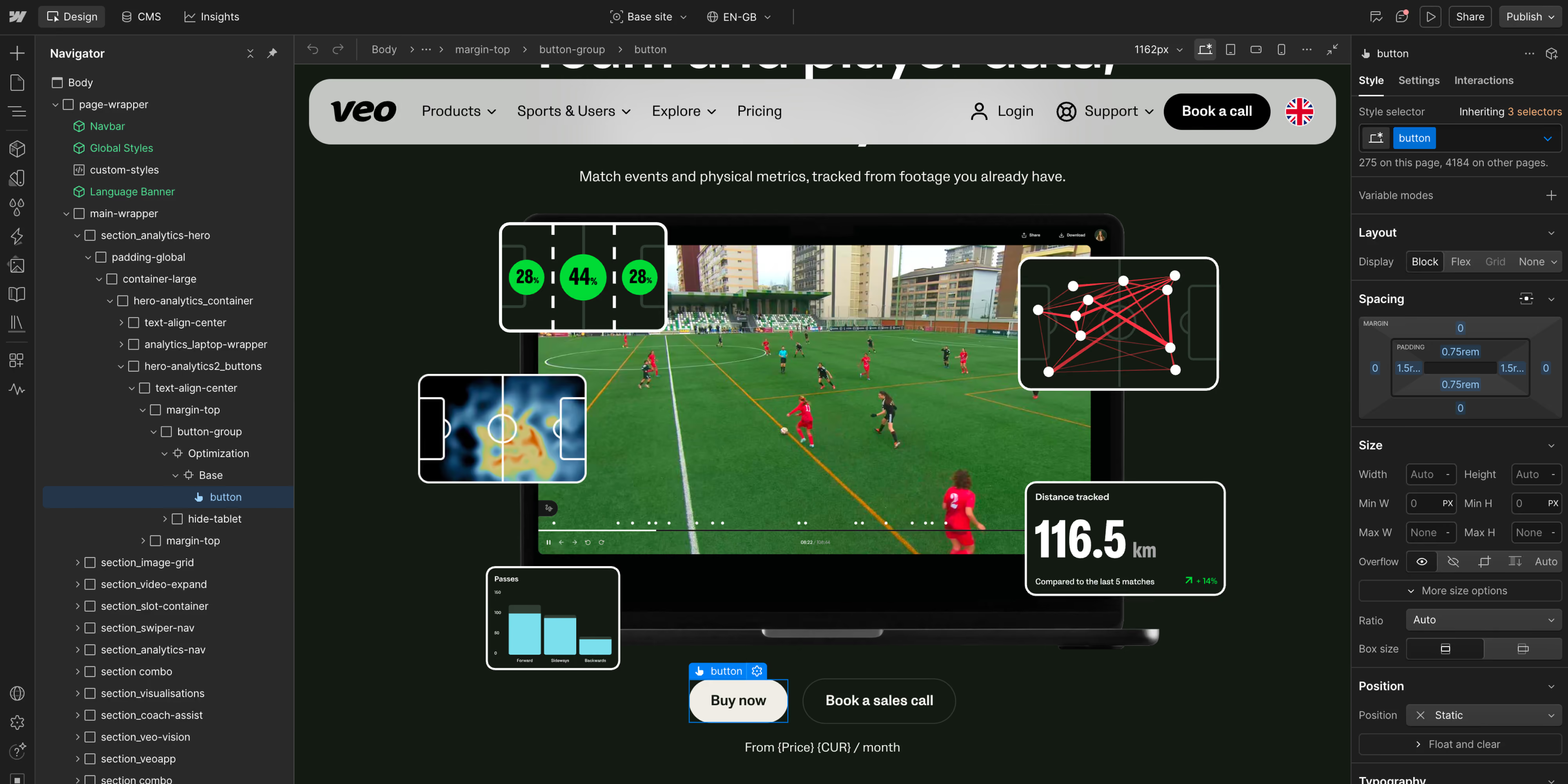
Screenshot of a webpage design interface displaying a sports analytics dashboard for tracking player metrics on a soccer field. The dashboard shows player positions, heatmaps, distance tracked of 116.5 km, and various data visualizations overlayed on a video of a soccer match, with interface panels and style options on the sides. Buttons labeled 'Buy now' and 'Book a sales call' are visible below the video.
50
The short version. Choose Webflow if a brand or marketing team needs to design, publish, and improve a website quickly without maintaining a .NET application. Choose Umbraco if custom backend logic, Microsoft technology, self-hosting, complex integrations, or architectural control are essential and you have developers to support them. Webflow usually fits a marketing-led scale-up; Umbraco can fit an organization whose website is part of a broader custom software estate.
key takeaways
  • 01
    Webflow is a managed SaaS platform; Umbraco is an open-source .NET CMS with a managed cloud option.
  • 02
    Webflow moves more website work into the hands of designers and marketers. Umbraco normally depends more on developers for templates, components, releases, and integrations.
  • 03
    Umbraco offers deeper control over application architecture, hosting, and custom business logic.
  • 04
    Umbraco Cloud starts at €45 per month, with Standard at €280 and Professional at €730 on the reviewed pricing page. Self-hosted Umbraco has no CMS license fee, but hosting and technical ownership remain.
  • 05
    Neither platform is automatically faster, safer, or better for SEO. The implementation, governance, content, and operating model decide the result.

The honest difference

Webflow reduces the technical work required to run a marketing site. Umbraco gives development teams deeper control over architecture, hosting, and custom logic.
Webflow packages the front end, CMS, hosting, CDN, SSL, and platform updates into one product. A team builds visually, creates reusable components and CMS structures, and publishes without managing servers. Custom code and integrations are possible, but the platform deliberately limits how much of its underlying infrastructure customers control.

Umbraco is open-source CMS software built on .NET. A technical team can shape the content model, front end, hosting, integrations, deployment pipeline, and application logic. Umbraco Cloud packages Azure hosting and platform services around that software, including automated patch updates and a deployment workflow, but customers still work with a conventional development lifecycle. Minor and major upgrades require planning and testing.

The choice affects staffing more than feature checklists. Webflow shifts day-to-day control toward design and marketing. Umbraco keeps more architectural decisions with developers and technical platform owners.
Side by side
Webflow
Umbraco
Product model
Hosted visual website platform and CMS
Open-source .NET CMS. Self-hosted or available on Umbraco Cloud
Primary users
Designers, marketers, content editors, front-end developers
.NET developers, solution architects, editors
Hosting
Included and managed
Your responsibility when self-hosted. Managed Azure hosting on Umbraco Cloud
Updates
Platform updates handled by Webflow
Core and package lifecycle requires technical ownership. Cloud automates patch updates
Design workflow
Visual canvas with responsive and interaction controls
Front end is normally designed and coded by the implementation team
Backend flexibility
Integrations, APIs, apps, custom code, and external services
Deep .NET customization and custom application logic
Content modeling
Structured CMS suited to marketing sites
Highly configurable document types and content architecture
Infrastructure control
Limited by design
High when self-hosted. More managed on Cloud
Public starting price*
Basic $15/month billed yearly. Premium $25/month billed yearly
Cloud Starter €45/month. Self-hosted CMS license is free
Best fit
Marketing-led sites and scale-ups
Custom .NET estates, complex integrations, and developer-led platforms
*Pricing is not directly comparable. Seats, add-ons, contacts, multiple sites, enterprise requirements, and implementation can change the total substantially.

Where Webflow wins

Webflow wins when marketing needs to publish and improve the website without depending on a .NET development backlog.

With a strong design system, marketers can assemble pages, update content, and launch campaigns without waiting for a full application release. Designers also retain more control over responsive behavior and interactions than they normally have in a conventional CMS authoring interface.

The managed model removes hosting, runtime maintenance, package patching, and framework upgrades from the marketing team’s workload. Governance, privacy, access management, and third-party scripts still need owners, but the platform is easier to operate. For a scale-up focused on brand, acquisition, and content, this usually means faster iteration and lower coordination costs.

Where Umbraco wins

Umbraco wins when the website must function as a custom .NET application with deep control over logic, integrations, and infrastructure.

Its .NET foundation fits organizations with Microsoft engineering skills, existing services, and requirements beyond a standard marketing CMS. Developers can control the data model, rendering, integrations, authentication, infrastructure, and release process.

It also suits teams that require a particular hosting region, infrastructure design, or self-hosting policy. Umbraco Cloud can reduce the hosting burden while preserving a conventional CMS development model. When complex permissions, editorial behavior, backend integrations, or application logic are central, the additional responsibility can be justified by the additional control.

Screenshot of a webpage design interface displaying a sports analytics dashboard for tracking player metrics on a soccer field. The dashboard shows player positions, heatmaps, distance tracked of 116.5 km, and various data visualizations overlayed on a video of a soccer match, with interface panels and style options on the sides. Buttons labeled 'Buy now' and 'Book a sales call' are visible below the video.Umbraco CMS back-office interface showing the Checkout section under Swift Shop with various checkout settings including Order Line Property Aliases, Checkout Back Page set to Cart, Terms and Conditions Page, Privacy Policy Page, Hide from Navigation toggle off, Require Login toggle on, and Login Page.

Where Webflow wins

Webflow wins when marketing needs to publish and improve the website without depending on a .NET development backlog.

With a strong design system, marketers can assemble pages, update content, and launch campaigns without waiting for a full application release. Designers also retain more control over responsive behavior and interactions than they normally have in a conventional CMS authoring interface.

The managed model removes hosting, runtime maintenance, package patching, and framework upgrades from the marketing team’s workload. Governance, privacy, access management, and third-party scripts still need owners, but the platform is easier to operate. For a scale-up focused on brand, acquisition, and content, this usually means faster iteration and lower coordination costs.

Screenshot of a webpage design interface displaying a sports analytics dashboard for tracking player metrics on a soccer field. The dashboard shows player positions, heatmaps, distance tracked of 116.5 km, and various data visualizations overlayed on a video of a soccer match, with interface panels and style options on the sides. Buttons labeled 'Buy now' and 'Book a sales call' are visible below the video.

Where Umbraco wins

Umbraco wins when the website must function as a custom .NET application with deep control over logic, integrations, and infrastructure.

Its .NET foundation fits organizations with Microsoft engineering skills, existing services, and requirements beyond a standard marketing CMS. Developers can control the data model, rendering, integrations, authentication, infrastructure, and release process.

It also suits teams that require a particular hosting region, infrastructure design, or self-hosting policy. Umbraco Cloud can reduce the hosting burden while preserving a conventional CMS development model. When complex permissions, editorial behavior, backend integrations, or application logic are central, the additional responsibility can be justified by the additional control.

Umbraco CMS back-office interface showing the Checkout section under Swift Shop with various checkout settings including Order Line Property Aliases, Checkout Back Page set to Cart, Terms and Conditions Page, Privacy Policy Page, Hide from Navigation toggle off, Require Login toggle on, and Login Page.

Which should you choose?

Ask one practical question: does your organization need to operate a custom .NET content application, or does the marketing team need to operate a high-quality website?
Choose Webflow if
  • Marketing and design should own most day-to-day website changes
  • Speed to launch matters more than control over the server and runtime
  • The site is primarily for brand, content, campaigns, and lead generation
  • You want to reduce CMS upgrade and infrastructure work
Choose Umbraco if
  • Your organization has .NET developers and wants them to control the platform
  • The website requires custom backend logic or deep integration with internal systems
  • Self-hosting, infrastructure policy, or data architecture is a deciding requirement
  • You accept a development and maintenance lifecycle in exchange for flexibility
Webflow is generally easier for smaller teams because it does not require a dedicated .NET capability. For scale-ups, Webflow fits a marketing-led site that must move quickly, while Umbraco fits companies whose product, portal, or technology estate already relies on .NET. At enterprise scale, Umbraco becomes more compelling when architecture, custom governance, regional hosting, and system integrations dominate; Webflow remains attractive for a faster marketing layer that can operate independently from core systems.
Umbraco has the higher backend and infrastructure ceiling. Webflow has the faster path to controlled front-end change. The relevant question is not which is “more flexible” in the abstract, but who needs the flexibility: a development team building an application, or a marketing team improving the customer-facing experience.
Webflow is a strong fit for technology, professional services, B2B SaaS, and design-led organizations. Umbraco is common where Microsoft technology, public-sector requirements, complex integrations, or custom digital services shape the platform. Procurement, security, and internal skills can matter more than industry labels.
Questions
Webflow is usually better for a marketing-led website that needs visual quality and fast publishing. Umbraco is usually better for a developer-led .NET solution with custom backend or infrastructure requirements.
The open-source Umbraco CMS can be downloaded and used without a CMS license fee. Operating it still involves implementation, hosting, monitoring, updates, security work, and developer time. Umbraco Cloud packages hosting and platform services into paid plans.
Webflow generally gives marketers and designers more direct control over layout and page production. Umbraco can provide an excellent editing experience, but its quality depends heavily on how the implementation team designs document types, components, previews, and workflows.
Both can support strong technical SEO. Webflow exposes common controls in a managed interface. Umbraco can implement almost any SEO requirement through code and configuration. Neither CMS creates authority or answer-engine visibility by itself; content quality, structure, crawlability, internal links, sources, and page experience remain decisive.
The CMS foundation is related, but the operating model differs. With self-hosting, your organization controls and maintains the infrastructure. Umbraco Cloud includes Azure hosting and platform services, automated patch updates, environments depending on plan, and support options. Larger upgrades still require testing and release planning.
Yes, when the public site’s requirements fit Webflow. A proper migration maps content models, URLs, redirects, media, forms, integrations, analytics, consent, and SEO data. Custom .NET features must be rebuilt through Webflow, external services, or a revised architecture; they cannot simply be copied.
Considering a move from Umbraco to Webflow?
Tell us where it hurts.
We will assess the content, integrations, and custom features first, and tell you honestly whether the migration simplifies the platform or merely moves complexity somewhere else.
Get in touch